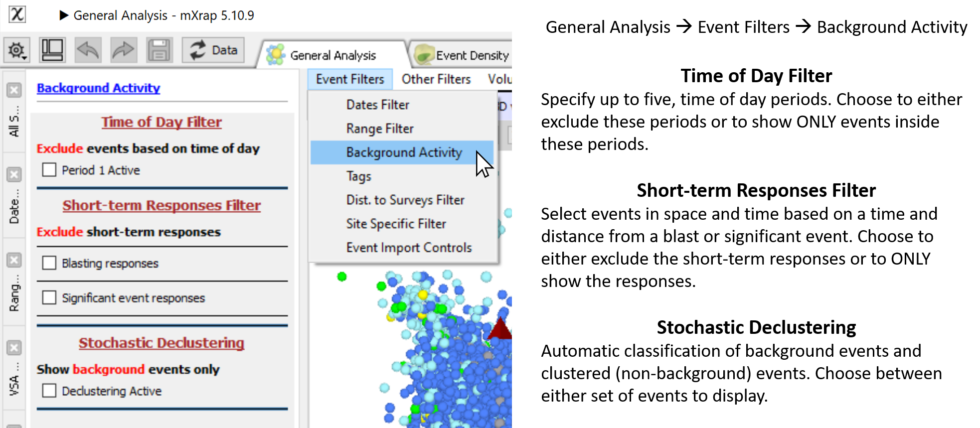
Background Filters
The time of day filter can be used to see the effect of removing events during blasting/shift change on the hazard results. You can either view the results in raw or normalised form. The hazard calculations do normalisation for the event rate calcs anyway, to represent hazard in yearly terms. If your analysis period is six months, the number of events is doubled to represent a year's worth of events. When applying the time-of-day filter though, the actual analysis period is less than six months, because several hours per day have been removed. Without normalisation, the hazard should always drop when applying the time-of-day filter, because you are removing events, and nothing else changes (i.e. still using 6 months). If normalisation is turned on, the time period that has been removed is accounted for in the hazard calculations. The results then represent accurately the state of the hazard during the relevant times of day.
'Background' events are generally defined as having low variability in space and time. The new background filters aim to identify events that are clustered in space and time and the user can either display the 'clustered' or the 'background' component of seismicity.
There are three ways of classifying clustered events; by time-of-day, by proximity to blasts and significant events, and by a stochastic declustering procedure. For more details on stochastic declustering, see the Stochastic Declustering Explained documentation.
With the time-of-day filter, you can specify up to five periods of the day, to define increased activity around shift change/blasting times. Times are entered in hours, e.g. 5:30pm = 17.5. Events within these periods will not be shown by default but you can toggle/invert the time-of-day filter to only show events inside the time-of-day periods (and hide events outside).
With the short-term responses filter, you can define a time period and spherical radius around blasts and significant events to filter out events. Use the normal blast filter to control which blasts are considered. Significant events are considered if they are within the current base filter, and above the specified magnitude. Note that the significant event itself is not filtered out (it is treated as a background event, not a clustered event). Just like the time-of-day filter, you can toggle/invert the filter to only show the responses, and hide events outside the response windows.
The last filter option is an automatic classification system for separating background and clustered events. You can toggle between each component of seismicity defined from stochastic declustering. For more details on this method, see the Stochastic Declustering Explained documentation.
Find the panel under 'Event Filters / Background Activity'.