Stope Reconciliation Wizard
Getting Started
The stope reconciliation process pulls in data from various sources to calculate the stope performance and potential root cause parameters. Here is listed the required data that can be imported into the app based on their purpose
Required data for reconciliation
- Design survey
- Mined survey
- Development survey for the mine
Required for quantifying parameters for analysis
- Structural model (fault surveys)
- For assessing the impact of major structures on stope performance
- Drill strings
- For assessing the impact of drill design on stope performance
- Blast database (
csv)- For analysing the mining sequence
- Ground support survey
- For visualising and analysing ground support performance
- Borehole Geotech database (
csv) and/or geotech blockmodel (csv)- To assess the impact of the rockmass quality on a per face or per octree basis. Can feed also into the Stability Chart. Note: the blockmodel is required for per octree analysis.
- This data can be exported from the RMDA app.
- Structural database (
csv)- Joint mapping database that can be used in the geotechnical window to determine the joints mapped around the stope. Can be used to feed into the B factor for the Stability Chart.
- This data can be exported from the RMDA app.
- Linear stress equation
- Equation used to calculate the stress at the stope depth and can feed into the factor A calculation for the Stability Chart.
- Economic blockmodel (
csv)- For site that have the prediction module only.
- Used to map grade value to the stope to assess dilution, loss of ore and value of the stope.
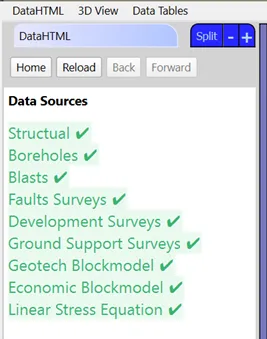
To determine if your data has been set up for your root, got to the Utilities app and open the Data Source Summary tab in the Site tools tab. The data that has been set up will be green.
App windows
Home window
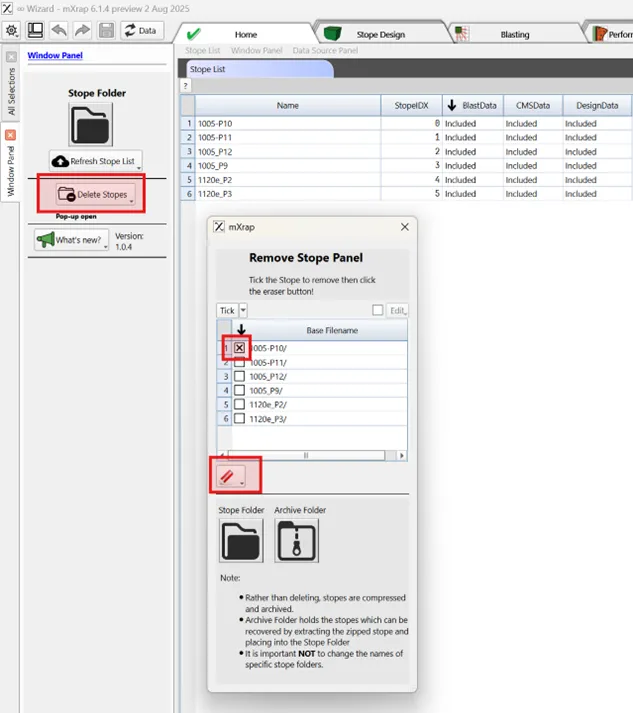
This window shows the stope database that exist in the app as well as the different steps completed for the stope (design, blast, CMS). In the panel, you have the option of the deleting a stope from the database if needed.
If you are interested in finding out what are the latest features added in the app, simply click the What's new? button in the panel.
You can look at the Home tab to see which stope already exist in the database.
Design window
The Design window allows to import the design survey and configurate the octree data structure, the stope faces and different parameters. This will get exported at the end to the stope database which can be used for the reconciliation and queried in the analysis app. Cycle through each Design step to understand how it works.
🪄 Required Design
Purpose
🪄 Octree
Purpose
🪄 Face Detection
Group octree blocks into faces with similar geometry.
🪄 Development
Import development for visualisation and calculating parameters.
🪄 Faults
Import structural surveys for visualisation and calculating fault parameters.
🪄 Ground Support
Used for approximate quantification of support per face
🪄 Convex Hull
Build convex hull to quantify the geometry of the stope including drives.
🪄 Geotech
Summarises geotechnical parameters per face.
🪄 Export
Simple data consistency checks and to export processed data.
🪄 Blasting
Allocation of blasting information to a stope design.
Walkthrough
A walktrough of the wizard app which allows yout import your stope data and reconcile your design with your mined survey.