Deriving Input Parameters
Use the 1st Window (Structural Analysis RMDA) to identify your structural domain by looking at variation in sets first; then save the DFN inputs parameters for each of these domains.
In order to do so, select the data you want to build a DFN with:
- Any volumetric filter: Geotechnical Domains, Lithology, Volume filter
- Any other relevant filter: Structure type, Mapping technique (it is recommended to not use borehole data, as these do generally not have spacing data matching scanlines or other data sources), etc.
Make sure that the structures sets have been assigned into mXrap when needed. . These can be imported in the column ‘Discontinuity set’ in the import csv or defined within mXrap. The stereonet 3D and the panel ‘Assign Discontinuity Set’ can help you to do so.
The Data Table in the DFN Generation Window shows needed input DFN parameters, derived from data, for each set.
The parameters in the tables are not calibrated. These are approximations of input parameters that need further calibration to fit the data.
If the rock mass includes randomly oriented structures, a random set can also be included in the DFN inputs.
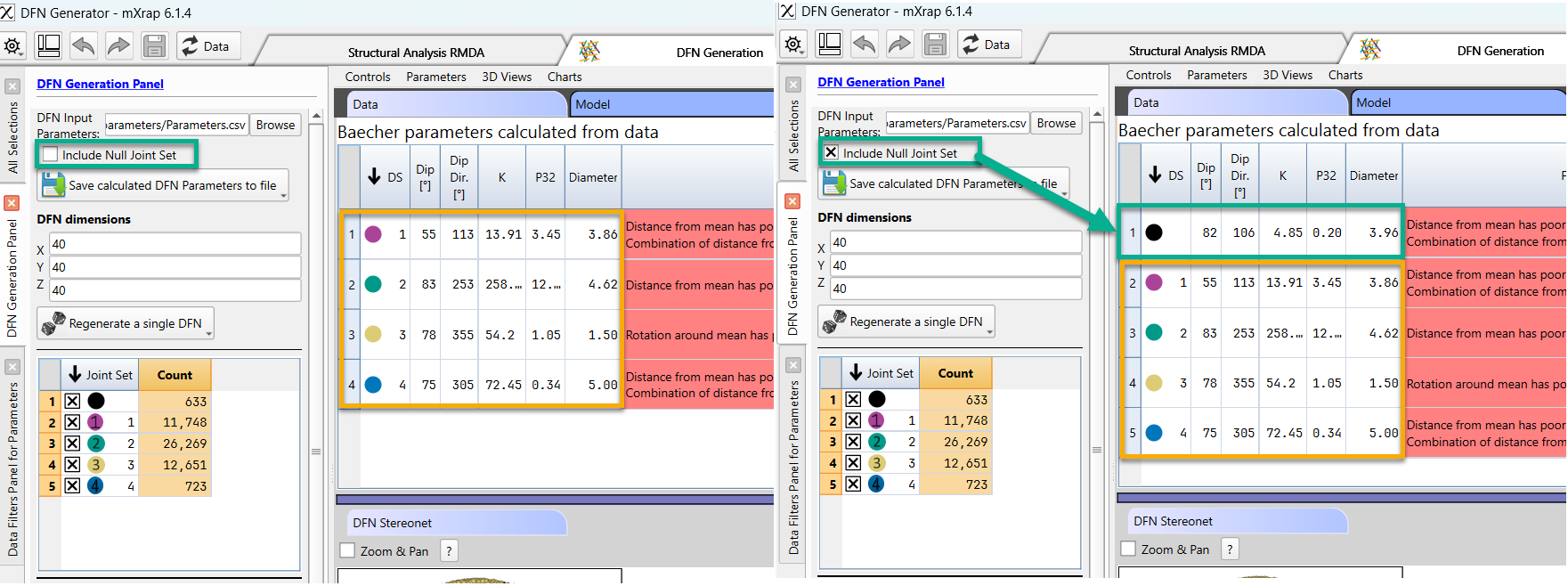
When you wish to generate a DFN from the filtered data, press button “Save Calculated DFN Parameters to file” to export the parameters calculated from data to DFN input parameters.
In the ‘Model’ table, you can adjust minimum - maximum of DFN inputs parameters to consider data uncertainty. These are most useful when geotechnical knowledge is the only data available. Note that it is not possible to calibrate the min-max values of the DFN inputs parameters.