Event Magnitudes
Why are the event magnitudes different in mXrap?
People often notice that the local magnitude of an event in mXrap is different from the magnitude shown in their other seismic software. This is usually because the local magnitude equations do not match.
Local magnitude is a calculated (derived) parameter. Normally its either based on seismic energy, moment/potency, or a combination of both. You should be able to find the relevant details for your site local magnitude in your seismic waveform processing software (e.g. WaveVis, Trace), otherwise contact your seismic service provider.
In mXrap, local magnitude can be imported along with the other event details from your seismic service provider although this does have low precision which can effect some of the charts and calculations. The reason for the 'stepping' sometimes seen in the frequency-magnitude chart is due to an imported local magnitude of only 1dp precision.
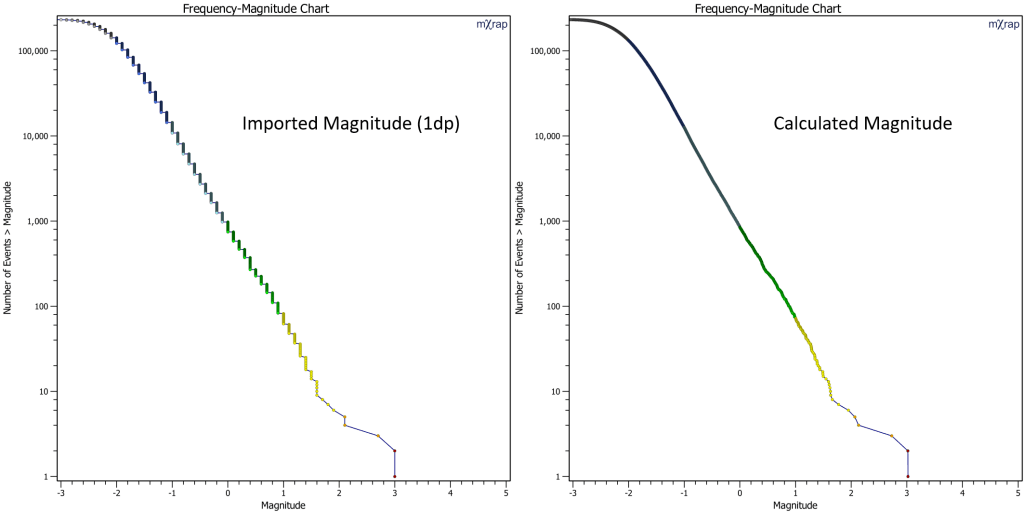
The limited precision is why we usually recalculate the local magnitude from the source parameters according to the following equation.
Where:
- = Energy coefficient
- = Moment coefficient
- = Constant offset
Standard Magnitude Scales
| Scale Type | CE | CM | C |
|---|---|---|---|
| Moment Magnitude1 | 0 | 2/3 | -6 |
| IMS Scale | 0.272 | 0.392 | -4.63 |
Configuration
ESG Events
Verify your site's magnitude equation with your seismic service provider, and configure appropriate variables General Setup.
- Multiple local magnitude options available
- Supports uniaxial and/or triaxial sensor configurations
- Settings located in: ESG Events Import app
General Settings
- Primary magnitude settings location: General Setup app → Magnitude tab