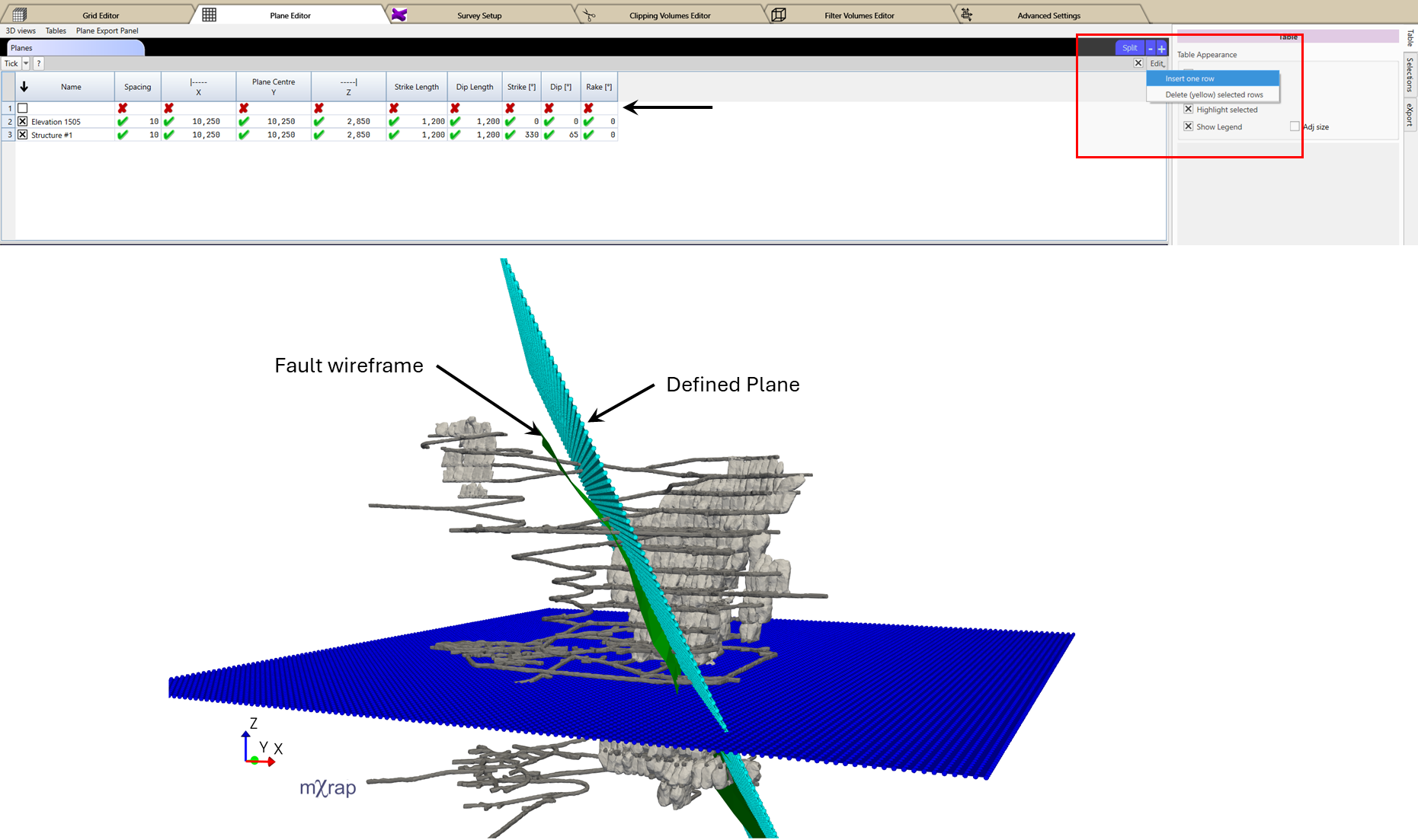
Plane Definition
A plane represents a two-dimensional surface within the three-dimensional analysis volume.
Plane Characteristics
- Centroid location
- Uniform spacing in local X and Y directions
- Orientation parameters
- Extents
Planes are typically used to:
- Analyze results along user-defined sections
- Evaluate seismic parameters along geological structures
- Visualize spatial trends on specific orientations
As with grids, planes are discretized based on the defined spacing, and analysis results are interpolated onto the selected planes.
Creating or Editing a Plane
- Navigate to: General Setup Windows → Plane Editor
- Use the Planes Table to add or edit plane definitions.
- Enable editing by ticking the check box next to the Edit button in the top-right corner of the table.
- For adding a new plane, click and hold the Edit button, then select Edit One Row.
- Enter the plane definition parameters - spacing, centre location, lengths and orientation.
- Use the 3D View to confirm that the plane adequately represents the target section or geological feature.
consejo
Use 3 point slicing planes in the 3D view to determine plane coordinates and orientation parameters.